Imagine sharing a link to your brand-new eBook, online course, or consulting service. Someone clicks the link, excited to see what you have to offer.
But instead of taking them straight to your offer, the link drops them on a crowded homepage filled with blog links, social media feeds, menu bars, and team photos.
Confused by all the choices, the visitor clicks around for a few seconds, gets distracted, and leaves without buying or signing up.
This happens every day to business owners and creators. When you give online visitors too many options, they end up choosing nothing at all.
That is why landing pages exist.
A landing page removes all unnecessary noise and points your visitor toward a single, simple goal. Understanding how landing pages work—and how to use them effectively—can transform your business growth by converting casual clicks into real email subscribers and paying customers.
What is a Landing Page?
In simple terms, a landing page is a standalone web page designed for one specific purpose. It is the page a visitor “lands” on after clicking a link in an email, a social media post, an online ad, or a search engine result.
Unlike regular web pages, a landing page does not try to tell your entire company story or showcase every service you offer. It focuses on one single offer and one clear action you want the reader to take.
How a Landing Page Differs from a Homepage
To truly understand what makes a landing page special, it helps to compare it to a standard homepage:
- A Homepage is a Front Door: It gives visitors an overview of your business. It contains navigation menus, links to different pages, company history, recent articles, and contact details. It is built for exploration.
- A Landing Page is a Direct Hallway: It has no navigation bar, no extra links, and no side distractions. It exists purely to present one offer and ask for one response.
Key Takeaway: A homepage invites people to browse around. A landing page asks people to make a clear choice: take the offer or close the page.
How Does a Landing Page Work?
The mechanics of a landing page are straightforward, but every step in the process serves a clear purpose. Here is how a landing page works from the moment a potential customer sees your link to the moment they complete an action.
[ Traffic Source ] ➔ [ Landing Page ] ➔ [ Action / Form ] ➔ [ Automated Follow-Up ]
Step 1: The Attraction (Traffic Source)
Before anyone can visit your landing page, they need a reason to get there. You place a link in a strategic spot where your target audience hangs out. This source might be:
- A post on social media explaining a free guide you created.
- A paid advertisement targeting people searching for a specific solution.
- A link in your social media bio.
- A promotional email sent to your existing audience.
Step 2: The Landing (First Impression & Offer)
When the user clicks your link, they land directly on your custom page. Within three seconds, the visitor should instantly understand:
- What you are offering.
- How it solves their specific problem.
- Why they should care right now.
The page uses clear text, strong visual layout, and reassuring details to guide the reader smoothly down the page.
Step 3: The Action (The Call to Action)
Every landing page centers around a Call to Action (CTA). This is usually a prominent button connected to a simple sign-up form. Depending on your goal, the page might ask the visitor to:
- Enter their name and email address to download a free guide.
- Register for an upcoming live session or webinar.
- Purchase a digital product or service.
- Book a free discovery call.
Step 4: The Backend Connection (Automated Delivery)
When the visitor fills out the form and clicks the button, the landing page sends that information to your email platform behind the scenes.
If you use a tool like MailDrip, the system automatically saves the new subscriber to your contact list and immediately triggers an automated email response. Your new subscriber instantly gets the free guide or welcome message in their inbox, without you having to lift a finger.
Common Types of Landing Pages You Should Know
Depending on what you want to achieve in your business, you will use different types of landing pages. Here are the four most practical types for creators and small businesses:
1. Lead Generation Pages (Opt-in Pages)
A lead generation page is designed to collect contact information—usually a first name and email address. In exchange, you offer a valuable free item called a lead magnet. Common lead magnets include:
- PDF checklists and workbooks.
- Free templates or cheat sheets.
- Mini-courses or video tutorials.
These pages are usually short and direct because the ask is simple and free.
2. Sales Pages
A sales page is built to make an immediate sale. Because buying something requires more trust than downloading a free file, sales pages are often longer and provide extra details. They explain the product features, answer common objections, display customer reviews, and show exactly what buyers get after purchasing.
If you are selling digital guides, templates, or courses, learning how to build a landing page that converts for digital products will help you turn your ideas into steady income.
3. Webinar & Event Registration Pages
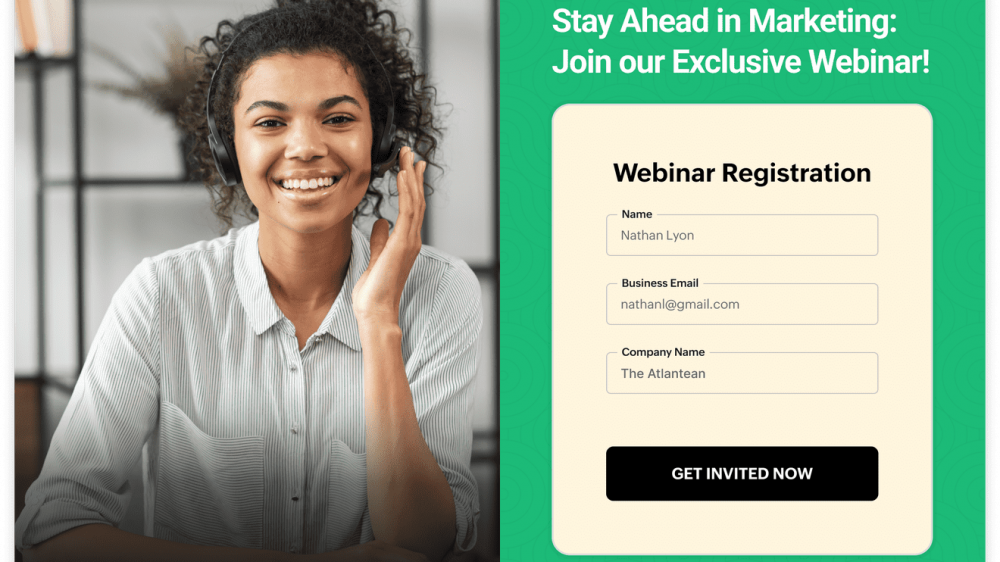
When hosting an online event, workshop, or training session, you need a dedicated page where attendees can reserve their spot. A webinar landing page highlights what attendees will learn, introduces the host, displays the event date and time, and provides a simple registration form.
4. Click-Through Landing Pages
Click-through pages act as a bridge between an advertisement and a final checkout page. Instead of asking for an email immediately, this page educates the visitor on the benefits of a product first. Once the reader is convinced, clicking the button takes them directly to the payment page.
The Core Elements of a High-Converting Landing Page
You do not need to be a designer or a professional writer to create a page that converts well. You just need to arrange a few key building blocks in the right order.
1. A Clear, Catchy Headline
Your headline is the first thing people read. It should state the main benefit of your offer in simple, plain language. Avoid clever or vague phrases. Be direct.

Take Your Emails to the Next Level
MailDrip helps you automate your outreach, nurture leads, and grow your brand with ease. Send the right message at the right time—without the stress.
Sign Up FreeNo Card Required
- Vague: “Transform Your Morning Routine Today”
- Clear: “A 15-Minute Daily Planner Template to Organize Your Workday”
2. A Supporting Subheadline
Directly under your headline, write one or two sentences that give extra context. Explain who the offer is for and what problem it solves.
3. Clear Benefits (Bullet Points)
People rarely read every word on a webpage—they scan. Use short bullet points to highlight the main benefits of your offer:
- Break down complex steps into simple actions.
- Highlight what readers will gain or save.
- Focus on outcomes rather than technical features.
4. Engaging Media
Include a high-quality image or short video demonstrating your offer. If you are offering an eBook, show a clean visual mockup of the book cover. If you are selling a service, show a friendly photo of yourself or a video walkthrough.
5. Social Proof
People feel far more comfortable taking action when they see that others have done so successfully. Include real testimonials, star ratings, or short quotes from past clients or readers to build instant trust.
6. A Simple Form and Call to Action (CTA) Button
Keep your form as short as possible. Asking for too much information upfront lowers your conversion rate. In most cases, asking for a first name and email address is all you need.
Make your CTA button easy to see with a contrasting color, and write button text that describes the outcome:
- Instead of “Submit,” use “Get My Free Checklist”
- Instead of “Buy Now,” use “Claim My Access”
Do You Really Need a Full Website to Have a Landing Page?
One of the biggest misunderstandings among new business owners and creators is believing you must build an entire multi-page website before you can start collecting emails or selling online.
You do not need a massive website to launch your ideas.
In fact, starting with a simple, focused landing page is often much faster and more effective. It allows you to validate your idea, build an email audience, and start making sales without spending weeks dealing with complex website builders, hosting settings, or web developers.
To see how straightforward this process can be, read this step-by-step guide on how to create a great landing page even if you don’t have a website yet.
Connecting Your Landing Page to Email Automation
A landing page is only half of the puzzle. What happens after a visitor submits their details is where real business growth takes place.
Once someone fills out your form, your email marketing platform takes over automatically. Here is how that seamless handoff works:
- Instant Delivery: The system immediately sends a welcome email containing the link or file the subscriber requested.
- Tagging and Organizing: Your platform tags the contact so you always know where they came from (for example: “Downloaded Marketing Checklist”).
- Automated Nurture Sequence: Over the next few days, an automated sequence of helpful emails arrives in their inbox to build rapport, share advice, and introduce your paid offers.
At MailDrip, we built our platform specifically so you do not have to wrestle with bloated software or complicated technical setups to make this happen. Built in Lagos, Nigeria, MailDrip was designed from the ground up for creators, solopreneurs, and growing brands who want straightforward tools that just work.
You get simple landing pages and opt-in forms ready to use right out of the box. You can even connect your existing personal or business Gmail account directly to your MailDrip dashboard to safely send your daily email campaigns without setting up complex technical servers.
Whether you want to send your first campaign or build an automated sequence that runs on autopilot, you can manage everything smoothly in one distraction-free space.
5 Landing Page Mistakes That Hurt Your Conversions
Even with great offers, small mistakes on your landing page can cause potential leads to walk away. Here are five common errors to avoid:
- Including Top Navigation Links: Adding links back to your homepage or blog gives visitors easy exits away from your main offer. Remove top menu headers entirely.
- Asking for Too Much Information: Every extra field you add to your sign-up form (like phone number, job title, or location) reduces the number of people who complete it. Collect only what you need.
- Using Confusing Jargon: Speak naturally, like you are explaining the offer to a peer. Avoid complex business buzzwords that confuse your readers.
- Ignoring Mobile Users: A large portion of your traffic will open your link on a smartphone. Always preview your page on a mobile screen to ensure text is legible and buttons are easy to tap.
- Forgetting to Follow Up: Collecting an email address without sending a prompt welcome message wastes the interest your visitor just showed. Always connect your page to an automated initial email response.
Frequently Asked Questions (FAQs)
What is the main difference between a landing page and a website?
A full website contains multiple pages with various topics and navigation menus designed for browsing. A landing page is a single, standalone page with no main navigation menu, focused on getting the visitor to complete one specific action.
How many calls to action should a landing page have?
A landing page should focus on one single primary action. While you can place multiple CTA buttons down the length of a long page, every single button should point to the exact same goal (such as signing up for the same list or purchasing the same product).
How long should a landing page be?
The ideal length depends on what you are asking from the visitor. If you are offering a simple free download, a short page works best. If you are asking someone to spend a significant amount of money on a high-ticket course or service, a longer page with full details and social proof is usually necessary to build trust.
How do I bring visitors to my landing page?
You can drive traffic to your landing page organically by sharing the link in your social media content, mentioning it in videos, linking to it in email newsletters, or optimizing the page for search engines. You can also use paid advertising on platforms like Google, Facebook, or Instagram to direct targeted users to your page.
Can I create a landing page for free?
Yes. Many platforms offer free entry options. For instance, MailDrip provides a free plan that includes 1,000 free emails and unlimited contact storage, making it easy to create sign-up forms, build landing pages, and start growing your email list at no initial cost.
Taking Your Next Simple Step
A well-designed landing page gives your online offers clarity and purpose. By removing extra distractions and guiding visitors toward one simple decision, you turn standard online traffic into a loyal, growing audience.
You do not need complicated technical skills, expensive software, or a massive marketing team to make this work. Focus on creating a straightforward offer, writing a clear headline, and linking your page to an automated follow-up system that cares for your new subscribers automatically.
If you are looking for an easy, simple way to set up landing pages, collect leads, and send automated email sequences without paying for features you do not need, explore MailDrip’s features and check out our transparent pricing plans. You can also visit the MailDrip blog for more practical guides on growing your brand.
What is one offer or idea in your business right now that deserves its own focused landing page?
