Imagine paying for an online ad, sharing a post on social media, or running a special promo, only to watch visitors leave your site without taking a single action. It is one of the most frustrating experiences for creators, solopreneurs, and business owners.
Most of the time, the problem is not your offer or your audience. The problem is where you sent them.
Many people make the mistake of sending all their traffic to their homepage. They assume that giving visitors every piece of information about their brand will help them buy. In reality, offering too many options leads to confusion, and confused visitors almost always click away.
Knowing the difference between a homepage and a landing page is one of the easiest ways to fix your conversion rates. Both pages serve important roles in your digital setup, but they are built for completely different purposes.
Here is a practical, easy-to-understand breakdown of how homepages and landing pages work, how they differ, and exactly when you should use each one to grow your audience and revenue.
What is a Homepage?
Think of your homepage as the digital front door or main lobby of your business. It is usually the first page people see when they type your main web address into a browser or look up your brand name on Google.
A homepage gives visitors a broad overview of who you are, what you do, and how you can help them. Because it welcomes all types of visitors—from first-time readers to returning customers—it includes multiple paths to explore.
Key Characteristics of a Homepage
- Broad Overview: It introduces your overall brand story, mission, and major products or services.
- Main Navigation Menu: It features a top header menu with links to various pages like About Us, Blog, Services, Contact, and Pricing.
- Multiple Call-to-Action (CTA) Buttons: It encourages visitors to explore different sections, such as reading recent blog posts, checking out product features, or contacting support.
- SEO-Focused Content: It is designed to rank for your main brand name and broad industry keywords on search engines.
Your homepage acts as an interactive map. Its job is not to force an immediate sale, but to help people orient themselves and find whatever they came looking for.
What is a Landing Page?
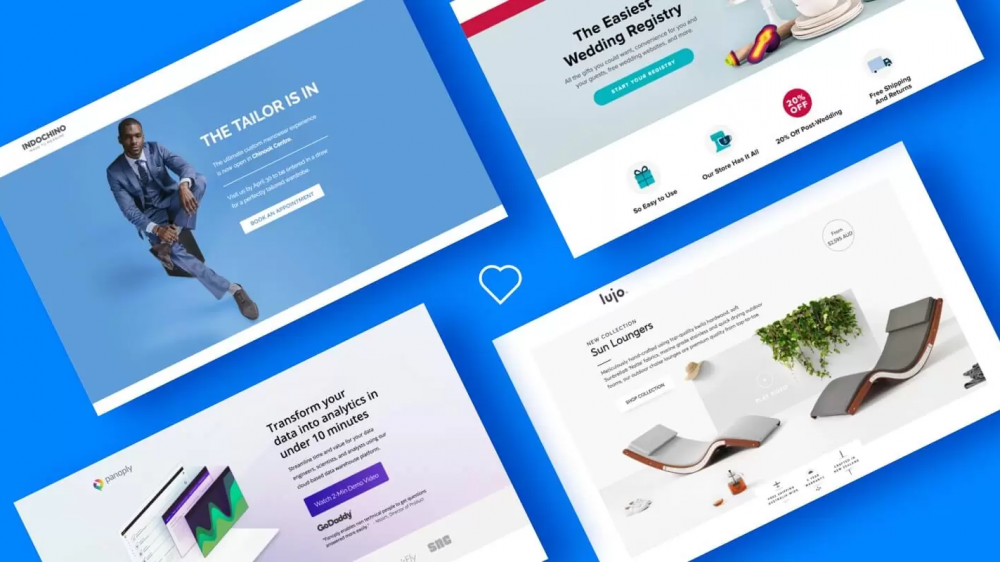
A landing page is a standalone web page created for a single, targeted marketing campaign. When a visitor “lands” on this page after clicking a specific link, ad, or email button, they are presented with one clear offer.
Unlike a homepage, a landing page strips away all extra distractions. There is no top navigation menu, no blog feed, and no secondary links. Everything on the page leads toward one specific goal.
Key Characteristics of a Landing Page
- Single Goal: It focuses on one single action, such as downloading an eBook, signing up for a newsletter, registering for an event, or purchasing a product.
- Zero or Minimal Navigational Links: It removes top header menus and sidebar links to keep visitors from wandering off.
- Targeted Copy: The headline, images, and text directly match the ad or campaign link the visitor clicked.
- Prominent Call to Action: It uses a bold button or sign-up form that directs the visitor to complete the main offer.
If a homepage is a lobby, a landing page is a dedicated meeting room where you present one specific offer and ask for a decision.
The Core Differences Between a Homepage and a Landing Page
Understanding how these two pages compare helps you choose the right tool for your goals.
1. Primary Purpose
- Homepage: Welcomes visitors, explains your overall brand, and guides people to different areas of your business.
- Landing Page: Converts traffic from a specific campaign by getting visitors to take one single action.
2. Visitor Intent
- Homepage: Attracts general browsers, organic search traffic, and people researching your company name. These visitors want to explore and learn.
- Landing Page: Attracts targeted traffic from paid ads, promotional emails, or social media campaigns. These visitors already know what they are looking for and are ready to respond to a specific offer.
3. Links and Navigation
- Homepage: Contains dozens of links, including header navigation, drop-down menus, footer links, and blog posts.
- Landing Page: Contains almost no external links. The only way forward is completing the conversion goal or closing the browser tab.
4. Content Focus
- Homepage: Broad and comprehensive. It covers your identity, team, product categories, news, and social proof.
- Landing Page: Specific and direct. It focuses entirely on a single problem, the proposed solution, social proof related to that offer, and a form to submit.
5. Conversion Rate
- Homepage: Generally has a lower overall conversion rate (often 1% to 3%) because visitors are doing different things.
- Landing Page: Usually delivers higher conversion rates (often 5% to 20% or higher) because it gives visitors only one task to complete.
When to Use a Homepage
A homepage is essential when you need to build long-term trust, organize your content, and introduce your complete brand experience.
Use a Homepage When You Want To:
- Build Brand Credibility: When new visitors search for your name on Google, your homepage acts as your official digital business card.
- Provide an Overview of Multiple Offers: If you offer several services, products, or resources, a homepage gives visitors a starting point to browse through everything.
- Improve Search Engine Optimization (SEO): A homepage helps organize your overall site structure, making it easier for search engines to understand and index your main content.
- Share Company Updates and Content: It serves as a central hub where visitors can easily find your latest news, customer stories, or articles on the MailDrip blog.
When to Use a Landing Page
A landing page is your best tool whenever you are asking people to do one specific thing. Sending promotional traffic straight to a homepage usually wastes time and budget because visitors get lost in the navigation menus.
Use a Landing Page When You Want To:
- Run Paid Advertising Campaigns: If you pay for Google Ads, Meta Ads, or TikTok Ads, always direct that paid traffic to a targeted landing page that matches your ad copy.
- Sell a Specific Digital Product: Whether you are launching an eBook, a course, or a template, a focused sales page explains the benefits without side distractions. For practical tips on this, check out our guide on how to build a landing page that converts for digital products.
- Collect Email Subscribers with Lead Magnets: When giving away a free guide or checklist in exchange for an email address, a simple opt-in page keeps the process fast and frictionless.
- Host a Event or Webinar: If you are running an online event, use a dedicated webinar landing page to highlight the event schedule, host bios, and a quick registration form.
- Test New Marketing Ideas: A standalone page makes it easy to test headlines, offers, or button colors to see what resonates best with your audience.
Do You Really Need a Complex Website to Start?
A common belief among new creators, digital marketers, and solopreneurs is that you must spend weeks building a full, multi-page website before you can sell anything or grow an email list.
That is simply not true.
In the beginning, clarity matters far more than having dozens of pages. A simple, well-crafted landing page is often all you need to start collecting leads, selling your first digital product, or growing an audience.

Take Your Emails to the Next Level
MailDrip helps you automate your outreach, nurture leads, and grow your brand with ease. Send the right message at the right time—without the stress.
Sign Up FreeNo Card Required
If you are just getting started, you can read our detailed guide on how to create a great landing page even if you don’t have a website yet.
Simplifying Your Setup with MailDrip
Setting up complex website platforms, configuring servers, and trying to tie together separate software tools can quickly cause technical overwhelm.
At MailDrip, we believe email marketing and lead capture should work smoothly without getting in your way.
We built MailDrip specifically for creators, digital marketers, and small business owners who want effective features without complex bloat. You do not need a complicated website infrastructure to build your audience.
Here is how MailDrip makes launching your campaigns simple:
- Landing Pages and Forms Included: You get clean opt-in forms and simple landing page features built right in. You can capture leads immediately without needing technical plugins or web developers.
- Automated Drip Workflows: Once a visitor signs up on your page, MailDrip can automatically send a sequence of emails to welcome them, share your lead magnet, or nurture them into paying customers.
- Connect Your Gmail Account directly: You can link your existing personal Gmail account to send up to 500 emails per day, or connect a Google Workspace business account to send up to 2,000 emails per day directly from your MailDrip dashboard. No server setup required.
- Flexible, Honest Pricing: Start for free with 1,000 free emails and unlimited contacts. When you need to scale, our Pay As You Go (PAYG) credit model means you pay only for what you use without being trapped in heavy monthly obligations.
You can review all our simple options on the MailDrip pricing page or explore what we offer on our MailDrip features page.
Best Practices for High-Converting Landing Pages
If you are ready to build a landing page, keep these practical design principles in mind to get the best results:
Rule of Thumb: Make the next step obvious. If a user has to pause and think about where to click, your landing page design needs simplifying.
- Match Your Headline to Your Source: The text on your landing page headline should closely match the phrase used in the ad or link your visitor clicked. This reassures them that they landed in the right place.
- Keep Forms Short: Ask only for the information you truly need. Requesting just a first name and email address usually brings far higher conversion rates than long forms with multiple required fields.
- Include Authentic Social Proof: Place real testimonials, reviews, or user numbers near your call-to-action button to reassure visitors that others trust your work.
- Focus on Benefits, Not Just Features: Instead of listing what your product or lead magnet contains, explain how it solves a specific problem or saves time for the reader.
- Ensure Fast Mobile Loading: Many of your visitors will view your page from a mobile device. Keep layouts simple so pages load fast on smartphones.
Frequently Asked Questions
Can a homepage also act as a landing page?
Yes, in some cases. If your business sells only one primary product or offers a single main service, your homepage can adopt landing page elements, like a strong top sign-up form and reduced navigation links. However, for most businesses with multiple pages and services, keeping them separate works best.
Will having multiple landing pages hurt my main website’s SEO?
No. Landing pages actually help your digital strategy. Search engines treat each page individually. As long as your landing pages contain high-quality, relevant content and avoid duplicating copy word-for-word across dozens of pages, having targeted landing pages gives you more opportunities to capture specific traffic.
How many landing pages should my business have?
There is no fixed limit. In general, create a separate landing page for every unique promotion, ad audience, digital product, or lead magnet you offer. Businesses with multiple targeted landing pages often generate significantly more leads because each offer feels personal to the visitor.
How do I follow up with leads after they sign up on my landing page?
When someone submits their information on your landing page, set up an automated welcome sequence to deliver what you promised immediately. Using an email marketing tool like MailDrip lets you create simple drip campaigns that automatically welcome new subscribers, build trust, and offer relevant products on complete autopilot.
Choosing the Right Page for Your Next Campaign
To keep your digital strategy clear, remember this simple rule:
Use your homepage to welcome curious visitors, introduce your brand, and offer a main guide to your entire online presence.
Use a landing page whenever you run a specific campaign, promote a dedicated offer, or run paid ads where you want visitors to complete one clear action.
When you align your page choice with what your visitor expects, your conversion rates grow, your ad spending delivers better returns, and building an audience becomes far less stressful.
Looking at your current marketing campaigns, are you sending your audience to explore a broad lobby, or inviting them straight into a focused conversation where it is easy to say yes?
