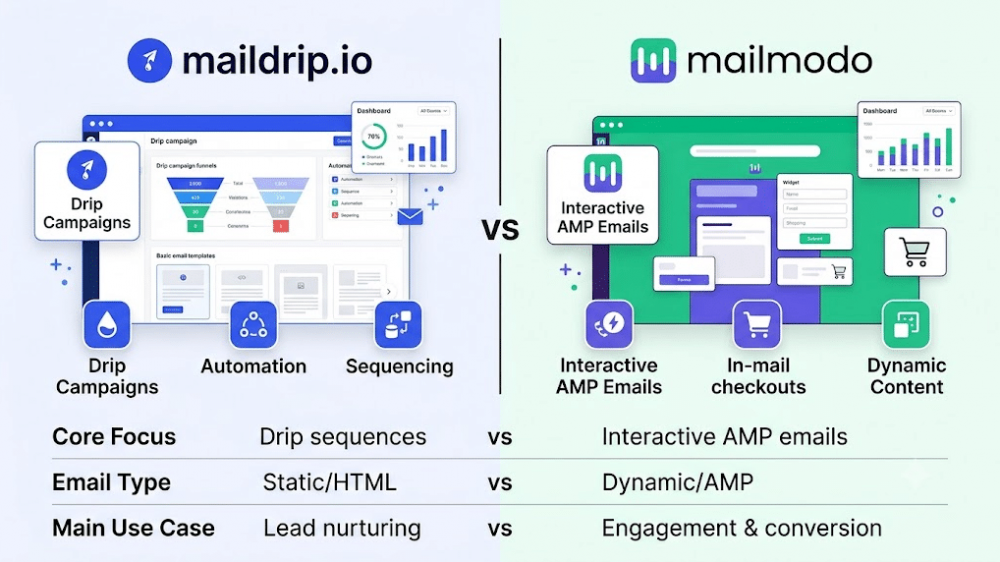
Choosing the right email marketing tool can feel like trying to pick a restaurant when you are starving. You want something that works fast, tastes good, and does not cost a fortune. But if you look at the market today, most email tools feel like they were built for massive corporations with huge tech teams. They are packed with complex buttons, confusing charts, and extra tools you will probably never use.
Two names often come up when trying to find a tool that stands out from the crowd: Maildrip and Mailmodo.
Both platforms take a very different path to help you reach your audience. Mailmodo focuses heavily on interactive elements, using advanced technology to let people fill out forms or shop directly inside an email. Maildrip, on the other hand, believes that email marketing should be clean, straightforward, and stress-free. It cuts out the tech noise so creators, solopreneurs, and digital marketers can focus on writing messages that actually make money.
Which of these platforms fits your specific workflow? Let us break down the details so you can make the right choice for your business.
The Core Philosophy: Fancy Features vs. Clear Focus
Before looking at the pricing or the buttons, it helps to understand why these two tools exist. A tool’s core design shapes how you will use it every single day.
Mailmodo: The Interactive Sandbox
Mailmodo is built around AMP (Accelerated Mobile Pages) for email. The big idea here is interactivity. Instead of clicking a link that opens a new tab in a web browser, Mailmodo lets your readers fill out surveys, book calendar appointments, or play mini-games right inside the email body.
While this sounds amazing on paper, it comes with a catch. Designing interactive emails takes time and technical patience. If you just want to share a quick update or launch a basic product sequence, building a mini-app inside an inbox can feel like overkill.
Maildrip: Simplicity First
At Maildrip, the philosophy is simple: you do not need more features, you just need the right ones. Born out of a desire to make email marketing calm and productive, Maildrip strips away the heavy, confusing extras that slow you down.
The platform acts as a focused creative space. It is designed specifically for people who want to write freely, keep their readers engaged, and build a steady business without wrestling with engineering problems. You get a clean interface where setting up a campaign takes minutes, not hours.
Feature Comparison: How They Actually Work
To understand which tool keeps your business moving forward, we need to compare how they handle everyday marketing tasks.
1. Building Campaigns and Writing
With Mailmodo, you spend a lot of time in a visual drag-and-drop editor trying to arrange interactive blocks. If your goal is to build a complex form inside an inbox, the builder gives you those options. However, the interface can easily become overwhelming if your primary goal is writing.
Maildrip focuses on a distraction-free environment. Writing an email should feel as easy as sending a message to a colleague. The platform provides modern, clean templates that look excellent on both phones and computers. It ensures your text is highly readable, which is the most important factor for getting people to take action.
2. Setting Up Automations and Drips
Automations are supposed to save you time by sending emails automatically while you sleep.
- Mailmodo uses a traditional flowchart style for automation. You map out nodes, triggers, and conditions on a massive canvas. It works well if you have a dedicated marketing manager, but it can be frustrating if you are running a business solo.
- Maildrip simplifies this through structured drip campaigns. You can organize an automated email sequence to nurture new subscribers without getting lost in endless logic webs. It gives you a clear path to turn a stranger into a loyal customer with minimal effort.
3. Landing Pages and Forms
What if you do not even have a business website yet?
Mailmodo expects you to connect their system to an existing website or platform to get the most out of it.
Maildrip understands that many creators and personal brands start from scratch. That is why it gives you high-converting landing pages and opt-in forms out of the box. You can build a page to collect emails, write your copy, and start growing your audience immediately without buying expensive web hosting or writing a single line of code.
Deliverability: Getting Into the Inbox
A beautiful or interactive email is completely useless if it ends up folder in the spam folder. Deliverability is the invisible engine of email marketing.

Take Your Emails to the Next Level
MailDrip helps you automate your outreach, nurture leads, and grow your brand with ease. Send the right message at the right time—without the stress.
Sign Up FreeNo Card Required
Mailmodo’s interactive AMP emails require specific technical setups. Not every inbox provider supports AMP. When an inbox does not support it, Mailmodo has to show a regular HTML fallback version instead. This means you often have to design your email twice to ensure it looks right for everyone.
Maildrip focuses heavily on reliable text and clean design deliverability. By keeping the code light and removing unnecessary background scripts, Maildrip ensures your emails look exactly as intended and land directly in the primary inbox. It takes care of the complex technical details behind the scenes so your sender reputation stays strong over time.
Pricing Structures: Commitments vs. Financial Freedom
How a platform charges you can completely change your business budget. Let us look at how these two tools handle your money.
Mailmodo’s Pricing
Mailmodo relies on traditional monthly subscription plans based on the size of your email list and the number of features you want. If your subscriber list grows, your monthly bill goes up automatically, even if you do not send campaigns to those new subscribers every single week.
Maildrip’s Flexible Options
Maildrip offers a different approach built around budget flexibility.
- The Free Plan: You get 1,000 free emails and unlimited contacts. Most platforms force you to upgrade the moment your list hits a certain number. Maildrip lets you collect as many contacts as you want without punishment.
- Pay As You Go (PAYG): If you do not want to commit to a monthly bill, you do not have to. You can simply buy email credits when you need them and use them when it makes sense for your business. This is perfect for creators who launch products occasionally or small businesses keeping costs predictable.
Customer Support: Bots vs. Humans
When an automated sequence stalls or you cannot figure out how to view your open rates, you need help immediately.
Many larger platforms, including Mailmodo, protect their support staff with layers of automated chatbots. You often have to click through multiple automated menus before a real human ever looks at your ticket.
Maildrip takes a personal approach with real human support available 24/7. You can get help through chat, email, and even WhatsApp. There are no rigid bots giving you canned answers. You talk directly to real people who understand marketing and want to help your business succeed.
Head-to-Head Breakdown
| Feature | Maildrip | Mailmodo |
| Primary Focus | Speed, simplicity, and clear writing | Interactive AMP elements and forms |
| Interface | Clean and distraction-free | Complex canvas with many options |
| Contacts Limit | Unlimited contacts on all plans | Limited based on your payment tier |
| No-Website Setup | Includes built-in landing pages | Requires external website setups |
| Pricing Model | Free plan & flexible Pay-As-You-Go | Strict monthly subscription tiers |
| Customer Support | 24/7 real humans (including WhatsApp) | Ticket system and automated bots |
Which One Should You Choose?
Choose Mailmodo if:
- You have a large marketing team with plenty of spare time.
- Your primary goal is creating interactive quizzes or checkout systems inside user inboxes.
- You already have a strong website infrastructure and a steady budget for monthly software costs.
Choose Maildrip if:
- You are a creator, solopreneur, or digital marketer who wants to focus on writing and selling without tech headaches.
- You want to start collecting leads immediately using built-in landing pages.
- You want financial freedom with a Pay-As-You-Go plan that does not punish you for growing your contact list.
- You value real, human support via WhatsApp and email whenever you get stuck.
FAQs
What is an interactive email?
An interactive email lets the reader take an action, like filling out a form or choosing a product option, directly inside the email without clicking away to a website. While it looks cool, it requires special inbox support and extra design time.
Can I use Maildrip if I do not have a website?
Yes. Maildrip provides built-in landing pages and signup forms out of the box. You can send traffic to your Maildrip link, collect email addresses, and start your campaigns instantly.
What does Pay As You Go mean?
Instead of paying a fixed fee every month, Pay As You Go allows you to buy a specific number of email credits. These credits only disappear when you actually send an email. If you take a break from sending for a month, you do not lose any money.
How does Maildrip handle contact limits?
Maildrip does not charge you based on how many subscribers you have. You get unlimited contacts, which means your billing is tied to how much you actually communicate, not how fast your community grows.
Final Thoughts
At the end of the day, a marketing tool should feel like a calm space that helps you work freely. It should never feel like an enemy you have to wrestle with every single morning.
Interactive features can be interesting, but they often add extra weight to your workflow. Clear text, reliable delivery, and a clean setup are what truly build relationships and generate income.
If you want to stop fighting with complicated automation flows and confusing subscription fees, you can sign up for a free account on the Maildrip Dashboard today. See how easy it is to launch your next big idea when the system gets out of your way.
When you think about your current marketing workflow, are your tools actually helping you move faster, or are they just giving you more settings to fix?
